
What is Inspection Reporting? How Inspection Reports Are Created and Used
Introduction
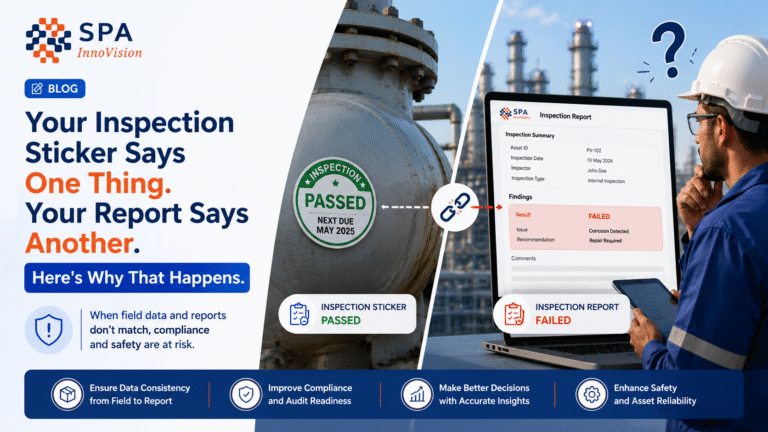
Inspection reporting is used in almost every industrial job. Teams use it to record what they inspect, what they find, and what actions are needed. It helps improve safety, quality, and compliance across sites.
An inspection report is a structured record created after an inspection. It shows equipment condition, site condition, or process status. It also includes issues, risks, and approvals.
Today, most companies use digital inspection reports instead of paper files. Digital systems make reporting faster, easier to track, and more accurate across teams.
Key Takeaways
- Inspection reporting helps teams record inspection results in a clear format. It improves safety, compliance, and decision-making across industries.
- A field inspection reporting process helps teams collect real-time data directly from sites. This reduces delays and improves accuracy in reporting.
- A digital inspection report reduces manual errors and speeds up report creation. It also improves visibility for managers and auditors.
- A proper inspection report format keeps reports structured and easy to understand. It helps teams maintain consistency across projects.
- A compliance inspection report supports audits and regulatory checks. It ensures companies follow industry standards like ISO, ASME, and safety rules.
What is Inspection Reporting?
Inspection reporting is the process of recording inspection results in a structured way. Inspectors write what they check, what they observe, and what needs action.
It helps convert field work into clear documentation. Teams use these reports to make decisions and track issues over time.
Inspection reporting is used in safety checks, equipment checks, QA/QC inspections, and industrial audits. It ensures every inspection is properly recorded and easy to review.
Why Inspection Reports Are Important
Inspection reports help teams stay organized during operations. They turn inspection data into structured records that everyone can use.
These reports help improve safety by showing risks early. They also help prevent failures in equipment and systems.
Without inspection reports, teams may miss important issues. Data may also get lost or misunderstood across teams.
Types of Inspection Reports
Field Inspection Reporting
Field inspection reporting is done directly at the worksite. Inspectors collect data using mobile devices or forms.
This method improves speed and reduces manual paperwork. It also helps capture real-time inspection results.
Compliance Inspection Reports
Compliance inspection reports check if work follows rules and standards. These reports are important for audits and certifications.
They help industries follow ISO, ASME, and safety regulations.
Digital Inspection Reports
A digital inspection report is created using software systems. It replaces paper-based reporting completely.
Modern platforms like InspectO help teams create digital inspection reports directly from field inspections. This improves speed, accuracy, and traceability.
Equipment Inspection Reports
Equipment inspection reports focus on machines and industrial assets. Inspectors check condition, damage, and performance.
These reports help reduce breakdowns and improve equipment life.
Safety Inspection Reports
Safety inspection reports record workplace risks and hazards. They help teams improve safety conditions across sites.
These reports are widely used in construction and industrial environments.
Inspection Report Format
An inspection report format is the structure used to create reports. It keeps information clear and easy to read.
Common Inspection Report Format
| Section | Purpose |
| Header | Site, date, and inspector details |
| Scope | What was inspected |
| Findings | Issues found during inspection |
| Evidence | Photos and notes |
| Results | Pass or fail status |
| Actions | Required corrections |
| Approval | Final review and sign-off |
A clear inspection report format helps reduce confusion during audits and reviews.
How Inspection Reports Are Created
Inspection reports follow a step-by-step process. Each step ensures data is collected and recorded correctly.
Step 1: Planning the Inspection
Teams first define what needs to be inspected. They assign inspectors and set schedules.
Systems like InspectO help automate this using work orders and inspection planning tools.
Step 2: Field Data Collection
Inspectors visit the site and collect inspection data. They check equipment, safety conditions, or processes.
They record findings using mobile devices or inspection forms.
Step 3: Recording Findings
Inspectors write down results and observations. They may also add photos and comments.
Digital systems reduce errors and improve data quality during this step.
Step 4: Report Generation
The system converts inspection data into a structured report. It organizes all findings into a readable format.
This step becomes faster when using digital inspection tools.
Step 5: Review and Approval
Managers review the report for accuracy. They approve it or send it back for correction.
This ensures proper quality control and compliance.
Step 6: Storage and Tracking
Approved reports are stored in a system. Teams can access them anytime for audits or reviews.
Digital systems make tracking simple and fast.
Digital Inspection Reporting with InspectO
InspectO is a digital inspection system designed for industrial reporting. It helps teams manage inspection workflows from start to finish.
InspectO supports field inspection reporting, report creation, and compliance tracking. It reduces manual work and improves inspection accuracy.
It is widely used in QA/QC, NDT, and industrial inspection environments.
Inspection Reporting in Labs and Testing
Inspection reporting also happens in laboratories. Lab data must be recorded in structured reports for compliance and accuracy.
AccuMatLab helps manage lab reporting and test data. It supports structured reporting and audit-ready documentation.
It improves accuracy in testing and helps link lab results with inspection workflows.
Certification and Traceability Reporting
Some industries need certification-based reporting. This is common in welding and fabrication work.
WeldTrack helps manage welder qualification reports and certification data. It tracks tests, approvals, and certificate validity.
It ensures full traceability and reduces errors in certification workflows.
Equipment and Lifting Inspection Reports
Lifting and heavy equipment inspections require strict reporting systems. These reports ensure safety and compliance.
ValiSpect helps manage lifting inspection reports. It supports equipment checks, compliance tracking, and inspection history.
It improves safety in lifting operations and industrial environments.
Build your own inspection checklist
During inspections, sometimes different clients provide specific inspection checklists and flexibility is needed for the checklist to be added. Additionally, the type of data to be captured for each checklist point can differ. One checklist point can be a Yes or No and the other as image or even as text to be entered. SPAVault provides this flexibility with its Checklist builder solution and also with Customer specific checklist template building.
DocuMatrix comes for rescue
Inspection checklists sometimes are just templates which technicians just prefer filling in paper, rather than on the gadgets. In SPAVault, DocuMatrix using intelligent AI based mechanism, supports scanning of the paper based checklist with the data and getting them converted to tests so that they can be given to supervisors for review. Technicians no longer have to be tech savvy, they do what they know and love the most, inspections!
Benefits of Digital Inspection Reports
Digital inspection reports improve speed and accuracy in industrial work.
Main Benefits
Digital reports reduce manual work and speed up reporting. They also improve accuracy and reduce human errors.
They help teams access data quickly from any location. This improves decision-making in real time.
Digital systems also support better audit readiness. All reports stay organized and easy to retrieve.
Inspection Reporting Challenges
Many companies still use manual reporting systems. These systems create delays and errors in data handling.
Common Issues
Paper reports can get lost or damaged. This creates gaps in inspection records.
Manual reporting also takes more time and effort. It slows down decision-making in operations.
Tracking reports becomes difficult when data is spread across files. This affects audit preparation.
Future of Inspection Reporting
Inspection reporting is moving toward fully digital systems. Companies now prefer faster and more accurate reporting tools.
Modern systems include automation, dashboards, and cloud storage. They improve visibility and reduce manual effort.
Platforms like SPAVault connect inspection, lab, welding, and asset systems into one ecosystem.
Conclusion
Inspection reporting is important for safety, quality, and compliance. It helps teams record inspection results in a structured way.
A proper inspection report format improves clarity and reduces errors. It also helps teams make faster decisions.
Digital systems now improve inspection reporting across industries. InspectO helps create fast and accurate inspection reports. AccuMatLab, WeldTrack, and ValiSpect support reporting in labs, welding, and lifting inspections.
Together, these systems improve control, traceability, and compliance in industrial operations.
FAQs
1. What is inspection reporting?
Inspection reporting is the process of recording inspection results in a structured format. It helps teams document findings and take action.
2. What is an inspection report?
An inspection report is a document that shows inspection results. It includes findings, risks, and final status.
3. What is a digital inspection report?
A digital inspection report is created using software. It replaces paper reports and improves speed and accuracy.
4. Why is inspection reporting important?
Inspection reporting improves safety, quality, and compliance. It also helps teams track issues and maintain records.
5. Which software is used for inspection reporting?
InspectO is used for inspection reporting. Other tools like AccuMatLab, WeldTrack, and ValiSpect support related reporting in labs, welding, and lifting inspections.